


Find my app
2.228.00 Reviews
App Specs
- Version
- 5.0.0
- Updated On
- License
- $1.49
- Downloads
- 10,000+
- Developer
- Gannon Developments Software
- Categories
- Personalization
- Platform
- Android, iOS
Screenshots
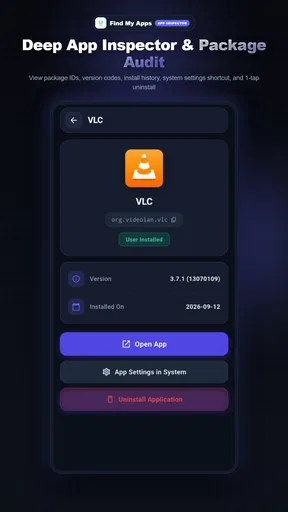
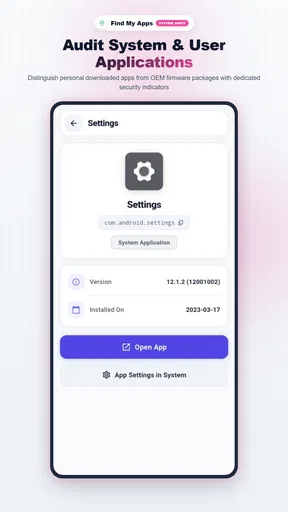
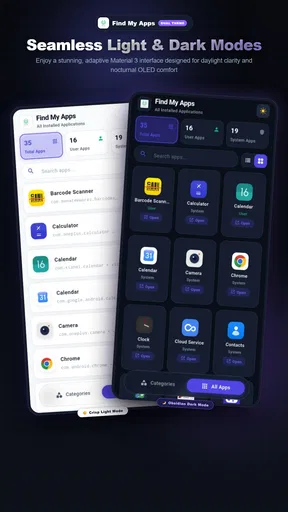
 Analysis by AppCompare
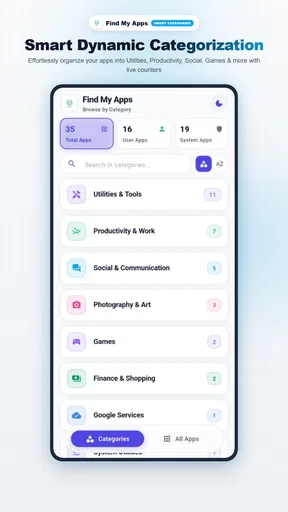
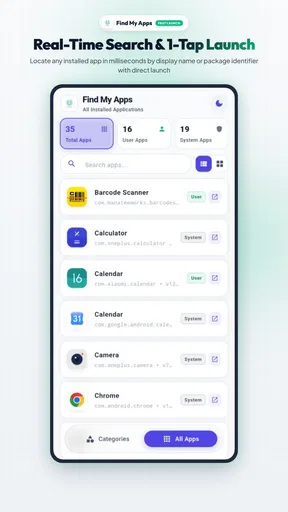
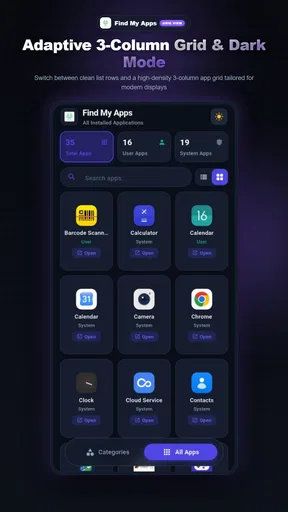
Before installing anything, I’d make one distinction clear: Find my app is presented as a way to locate and open apps on your phone, not as a tracker for misplaced devices or keys. That difference matters. If you have a crowded screen and forget where you put a particular app, the idea is to use this tool as a shortcut back to it. I’d approach it as a small navigation aid rather than a security or location service.
What to expect from an app finder
On a phone, the familiar alternative is to swipe through home screens, search the app drawer, or type a name into the built-in system search. Those options are already convenient for many people, so an extra app earns its place only if it makes finding and opening apps feel easier in your own routine. I would judge this one by a simple test: can I reach an app I often overlook without having to remember which folder or screen I put it on?
The distinction between locating an app and locating a device is also worth keeping in mind when deciding whether this is right for you. It is aimed at people whose problem is finding software on their phone. If you want to ring a lost handset, see its position on a map, lock it remotely, or protect its contents, use the phone’s built-in device-finding service instead. Those are different jobs, and choosing the right tool avoids a frustrating first impression.
Start with one small setup check
Because this is an Android app, I’d begin by checking that the phone meets its minimum operating-system requirement: Android 7.0. The current release is version 5.0.0, and the developer is Gannon Developments Software. It costs $1.49, is rated for Everyone, and has reached over 10,000 installs. It was released on August 12, 2024. Those details make it a paid utility rather than a no-cost replacement for the search already built into many phones, so I’d decide what specific annoyance I hope it will solve before buying.
For the first run, keep the goal modest. Open the app and try to use its central purpose: finding an installed app and opening it. I would start with something whose name I know but whose icon I would struggle to spot, rather than testing with a familiar app that is already on my home screen. That gives you a fairer sense of whether this extra step helps. If your phone asks for access needed to perform its task, read the prompt and make a choice you’re comfortable with instead of approving requests automatically.
Make the first useful test repeatable
A practical first test is to pick one app you use occasionally, such as a travel, banking, or document app, and try to reach it through Find my app when you would normally search manually. Then repeat the same task another time. The point is not to chase a dramatic demonstration; it is to see whether the route feels clear enough that you’ll remember it when you’re in a hurry.
There is a small but useful habit here: choose a target app that is installed but not already easy to reach. If you test with your most-used app, a home-screen icon will probably win. If you test with a rarely used tool buried among folders, you can judge whether the app finder solves a real problem rather than merely adding another icon to manage. I’d also try searching with the name you naturally use, not just the exact wording on the app’s icon.
Worth Reading Before You Choose

Flipboard Shows What News Apps Must Do Beyond the Feed

Switching to Android Auto Means Rethinking Your Driving Routine

Google Calendar Makes a Crowded Week Easier to Manage

Ludo King Makes the Most of the Minutes Between Plans

Baby Panda World Brings Quick Play to Modern Phones, but Its Game Library Feels Busy

ESPN’s Live Game View Makes Following Close Games Easier
Where the convenience can fall short
The main trade-off is that a finder app becomes another app you must remember to open. If the phone’s built-in search already finds and launches everything quickly, paying for a separate tool may not improve your day. I’d also avoid assuming that it can locate hardware, manage smart-home equipment, or handle account security: its stated purpose is to help you find and open apps on your phone.
For a realistic example, imagine you’re at a checkout and need a loyalty app you use only occasionally. You know it is installed, but you can’t recall whether it is in a shopping folder or on another screen. This app may be useful if opening it through the finder feels more direct than backing out of the checkout queue to search around. But if you already launch apps by typing their names into your phone’s system search, that built-in route may be just as quick and costs nothing extra.
Who should try it, and who can skip it
I can see the appeal for someone who has many installed apps, keeps a deliberately minimal home screen, or repeatedly forgets where less-used tools live. It may also suit a first-time smartphone user who is still learning how apps are organized and wants a straightforward way to get to one by name. A helpful way to assess it is to keep track of the specific apps you struggle to find for a few days; if that problem comes up often, a dedicated finder is easier to justify than if it happens once in a while.
I’d skip it if you only have a small collection of apps, are happy with your existing folders, or rely on the search function already built into your launcher or phone. It is also the wrong choice if your concern is a missing phone rather than a missing app. Those built-in tools and device-finding services address different needs, and there is no reason to add a paid app unless its particular route to opening software works better for you.
Check whether the value holds up
The app has an average rating of 2.2 from around 150 ratings, with around 20 written reviews. I would treat that as a reason to test the experience carefully, not as proof that it will or will not suit your phone. Personalization and navigation habits vary: one person may find a dedicated route useful, while another sees no improvement over the system search. Since it costs $1.49, the sensible question is whether it saves you repeated effort, not whether the idea sounds handy in theory.
When comparing it with alternatives, think about the actual action you want to make easier. A launcher can organize icons and change how the home screen looks; system search can often find apps without an extra purchase; and a device-finding service is for locating hardware. Find my app occupies the narrower space of helping you locate and open apps. That focus can be a plus if you want a direct tool, but it also means it should not be judged by features meant for those other jobs.
First Impressions
When I first downloaded the Find My App, I was immediately drawn to its sleek and intuitive interface. It's not overloaded with unnecessary buttons or confusing menus. Everything's laid out pretty straightforwardly, which is a blessing when you're in panic mode trying to locate your phone or keys.
Setting it up was a breeze. You start by linking your devices. The app guides you through the process, and before you know it, everything you need is connected. The app supports multiple devices, so whether you're an Android fan or an iOS devotee, you’re covered.
Features That Stand Out
One of the coolest features of this app is its real-time location tracking. The moment you open the app, it pings your device and shows you exactly where it is on a map. It’s like having a GPS tracker for all your gadgets. I tested it out by hiding my phone in different places around the house, and each time, the app pinpointed its location with impressive accuracy.
Another handy feature is the "Lost Mode." If you know your device is somewhere nearby but can't quite put your finger on it, you can activate this mode to emit a loud sound, even if your phone is on silent. Trust me, it's saved my bacon more than once when my phone decided to take a nap under the couch cushions.
Security and Peace of Mind
The app also scores high on the security front. You can remotely lock your device, display a message for anyone who finds it, and even erase all data if you fear it’s in the wrong hands. It’s like having a security guard for your digital life.
Plus, the app gives you a little extra peace of mind with its notification system. Whenever your device's location changes significantly, you get an alert. This feature is perfect for parents keeping tabs on their kids or for those of us who are just plain forgetful.
Integration with Other Devices
What’s really neat is how Find My App integrates with other smart devices. If you’ve got a smartwatch, you can use it to locate your phone, or vice versa. This cross-device functionality is seamless and adds an extra layer of convenience.
Another perk is the app’s ability to sync with your smart home devices. Imagine losing your phone in the house and just asking your smart speaker where it is. It’s a real game-changer.
What Could Be Better?
While the app is fantastic, it’s not without its quirks. Occasionally, the location services can be a bit slow in updating, especially in areas with poor signal. It’s not a dealbreaker, but it can be a tad frustrating when you’re in a hurry.
Additionally, the battery usage can be a concern if you have the app running constantly in the background. It’s something to keep an eye on if your device’s battery life is already on the shorter side.
Final Thoughts
Overall, the Find My App is a must-have tool for anyone prone to losing their devices. It’s user-friendly, reliable, and packed with features that genuinely make life easier. Whether you're tracking down a misplaced phone or ensuring your data stays safe, this app has got you covered.
If you’re on the fence, I’d say give it a shot. It's free to download, and the peace of mind it offers is absolutely worth it. So go ahead, embrace your inner detective, and let Find My App do the heavy lifting.
A final check before relying on it
There is one point I would resolve before putting this app into a daily routine: the product name and the practical purpose need to match what you’re looking for. For a first-time user, I would rely on the clear task of finding an installed app, not on the older device-tracking claims in the section above. That keeps expectations grounded and helps avoid treating an app finder as a way to recover lost hardware.
My recommendation is therefore conditional rather than automatic. If you routinely lose apps among folders and the built-in search feels inconvenient, trying this focused utility may be worthwhile. If your phone already lets you find and open apps quickly, keep using that familiar option. The best outcome is simple: you know exactly which problem you want solved, test it with an app you often overlook, and keep it only if that first useful action feels easier.
Pros
- User-friendly interface with intuitive navigation.
- Accurate location tracking in real-time.
- Cross-platform compatibility for Android and iOS.
- Customizable alerts for specific locations.
- Battery-efficient performance.
Cons
- Requires constant internet connection.
- Some features locked behind paywall.
- Privacy concerns over data sharing.
- Occasional lag in crowded areas.
- Limited support for older devices.
FAQs for Find my app
What is the main purpose of Find My App?
Find My App is designed to help users locate their devices when they are lost or misplaced. It offers features like real-time GPS tracking, remote locking, and the ability to emit sound alerts even when the device is on silent. This ensures that users can quickly and efficiently recover their devices.
Is Find My App compatible with all devices?
Find My App is compatible with most Android and iOS devices. However, it's important to check the specific device requirements and operating system compatibility on the app store page before downloading. Some older models may not support all features of the app, which could limit its functionality.
How does the privacy and security work in Find My App?
Find My App takes privacy and security seriously by using encrypted connections to protect user data. Location information is only accessible to the account owner and is not shared with third parties. Additionally, users can manage their privacy settings to control what information is stored and shared.
What should I do if Find My App is unable to locate my device?
If Find My App cannot locate your device, ensure that the device is connected to the internet, either via Wi-Fi or cellular data. Check if location services are enabled on the device, and confirm that the app has the necessary permissions. Restarting the device may also help resolve connectivity issues.
Are there any costs associated with using Find My App?
Find My App offers a free version with basic features. However, there may be premium options available that provide additional functionalities, such as extended location history or advanced security features. Users should review the pricing details on the app store to understand any potential costs before downloading.


